Server Workload Attestation Extension
The Server Workload Attestation Extension is an HTTPS webhook that you operate and the Trust Domain Server calls while issuing a SPIFFE Verifiable Identity Document (SVID). The webhook receives the attributes collected during workload attestation, and returns either a set of custom attributes to attach to the workload identity, a rejection that permanently denies issuance, or a retryable error.
This method runs on the Trust Domain Server during SVID issuance. For collecting custom attributes locally on the agent host, see the Agent Workload Attestation Extension. For extending agent attestation (when the agent connects to the Trust Domain Server), see the Agent Attestation Extension. For extending serverless attestation (when workloads request SVIDs directly, without an agent), see the Serverless Attestation Extension.
The reject response key described in Rejecting and erroring requires spirl-server 0.40.0 or later. Earlier versions support only error, which cannot be used to indicate an SVID should not be minted.
Why use a server extension
During workload attestation, Defakto collects attributes from platform sources such as Kubernetes, Docker, and Linux. A server extension is the right tool when the decision or the data lives outside the workload's host. Examples:
- Enrich with external data. Add attributes from a Configuration Management Database (CMDB), an asset management system, or a service catalog.
- Deny issuance. Reject SVID requests for workloads that fail a compliance check, are absent from an inventory, or violate a custom authorization rule.
- Organization-specific metadata. Attach team ownership, cost center, or environment tags maintained centrally.
- Dynamic attribute assignment. Compute attributes from business logic no platform attestor can express.
How it works
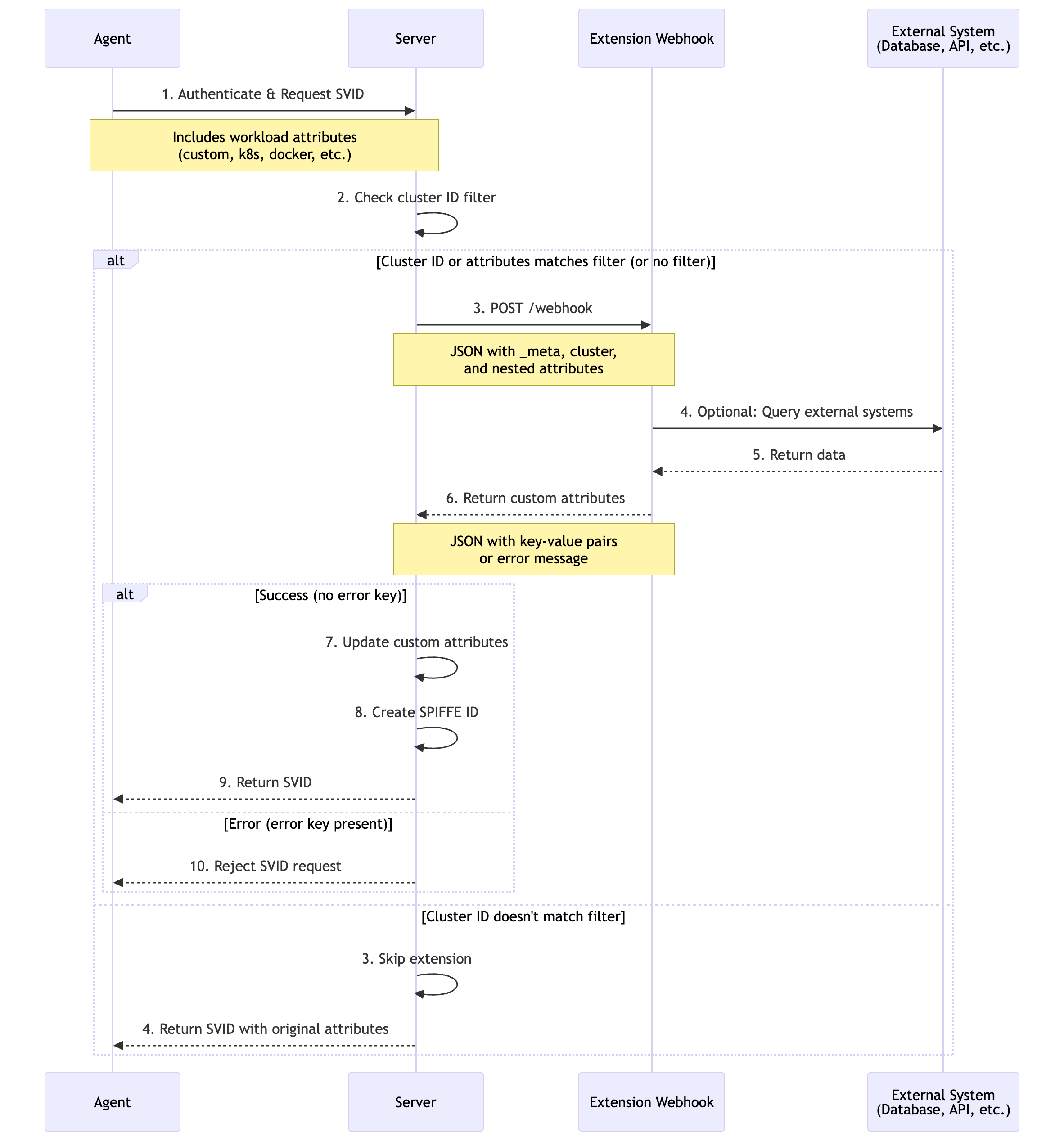
- Workload requests an SVID. The agent collects platform attributes and forwards the request to the Trust Domain Server.
- Server evaluates filters. The server checks whether the cluster ID and workload attributes match the configured filters. See Attribute filtering.
- Webhook invocation. The server sends an HTTP POST request carrying the workload attributes to the webhook endpoint.
- External enrichment. The webhook processes the attributes and optionally queries external systems.
- Response processing. The server receives custom attributes, a rejection, or a retryable error.
- SVID issuance. On success the custom attributes are added to the workload identity. A rejection denies issuance outright. An error is retried and denies issuance only once retries are exhausted. See Rejecting and erroring.
Attributes available for SVID issuance
Custom attributes returned by the webhook have the origin custom. The attribute names are defined by your webhook implementation.
| Attribute | Description |
|---|---|
custom.<key> | Any key returned in the webhook's JSON response |
Example SPIFFE ID path template using webhook-returned attributes:
/{{custom.environment}}/{{custom.team}}
What the response can and cannot change
The response replaces the entire custom origin, rather than adding to it. The server keeps every non-custom attribute, discards all existing custom.* attributes, then inserts the keys the webhook returned.
Three consequences follow:
- Omission deletes. A
custom.*attribute the webhook does not return is gone from the issued identity. To keep one, return it. - Platform attributes are untouchable. Attributes from Kubernetes, Linux, Docker, and the other attestors are always carried through. A webhook cannot modify or remove them, and does not need to echo them back.
- Keys cannot collide with platform attributes. Every returned key is namespaced under
custom, so returningkubernetes.pod.namespaceproducescustom.kubernetes.pod.namespace. It does not shadow the realkubernetes.pod.namespace.
An empty string is a valid value, producing custom.<key>="".
If the Agent Workload Attestation Extension is also in use, its attributes arrive under the same custom origin, so a server webhook that does not return them drops them. When running both, have the server webhook echo back the agent-supplied keys it wants to keep. Read them from the request body, where they arrive alongside the platform attributes.
Configuration
The server extension is configured through the spirl-server Helm chart, under trustDomainDeployment.deployment.extensionWorkloadAttestation.
This extension is configured through Helm values. Changes require a helm upgrade and take effect as the Trust Domain Server pods are replaced.
webhookCaCert and token are the exception. Changing either does not rotate the server pods on its own. See Rotating the CA bundle or the token.
Helm values
trustDomainDeployment:
  deployment:
    extensionWorkloadAttestation:
      # Required: Webhook URL (HTTP or HTTPS)
      # If empty or not specified, the extension is disabled
      webhookUrl: "https://attestation-service.company.com/webhook"

      # Optional: Request timeout (Go duration format)
      timeout: "10s"

      # Optional: Cluster ID filter
      # If empty, the extension is invoked for ALL clusters
      invokeForClusterIds:
        - "c-1111111111"
        - "c-2222222222"

      # Optional: Workload attributes filter
      # If empty, the extension is invoked for ALL workloads
      invokeForWorkloadAttributes:
        - "custom.appid"
        - "kubernetes.pod.namespace==production"

      # Optional: CA certificate to validate the webhook's TLS certificate
      webhookCaCert: |
        -----BEGIN CERTIFICATE-----
        CERTCHAIN
        -----END CERTIFICATE-----

      # Optional: Authentication type
      authenticationType: "BEARER"

      # Optional: Bearer token, supplied as plaintext
      # The chart base64-encodes it when writing the Kubernetes Secret
      token: "your-secret-token"
Configuration reference
| Field | Type | Required | Default | Description |
|---|---|---|---|---|
webhookUrl | string | When enabled | — | HTTP or HTTPS endpoint the server calls. The extension is enabled only when this is set to a non-empty value |
timeout | duration | No | 5s | Maximum wait time per webhook call (Go duration format: 10s, 1m) |
invokeForClusterIds | []string | No | [] | Restrict invocation to specific cluster IDs. Empty means all clusters |
invokeForWorkloadAttributes | []string | No | [] | Restrict invocation to workloads matching an attribute pattern. Empty means all workloads |
webhookCaCert | string | No | System roots | PEM-encoded CA bundle for validating the webhook's TLS certificate |
authenticationType | string | No | NONE | Authentication type: BEARER or NONE |
token | string | No | In-cluster service account token | Bearer token used when authenticationType is BEARER |
Supply token as plaintext. The chart handles the encoding and provisions a Kubernetes Secret for delivery to the server pods.
Leaving token unset while authenticationType is BEARER makes the server present its own in-cluster service account token. Use that form when the webhook validates callers with the Kubernetes TokenReview API.
Rotating the CA bundle or the token
Most fields become command-line arguments on the server container, so changing one changes the pod template and helm upgrade rolls the pods. webhookCaCert and token are delivered as mounted files instead, leaving the pod template untouched, so rotating either needs an explicit restart.
Follow the upgrade by triggering a rollout of the deployment:
helm upgrade "$DEPLOYMENT_ID" oci://ghcr.io/spirl/charts/spirl-server \
  --namespace "$DEPLOYMENT_ID" --reuse-values \
  --set trustDomainDeployment.deployment.extensionWorkloadAttestation.token="new-token"
kubectl -n "$DEPLOYMENT_ID" rollout restart deployment -l app.kubernetes.io/name=spirl-server
kubectl -n "$DEPLOYMENT_ID" rollout status deployment -l app.kubernetes.io/name=spirl-server
Until the rollout completes, server pods still present the previous token.
Attribute filtering
Filtering controls when the server calls your webhook. Narrow filters keep the webhook off the critical path for workloads it has no opinion about, which limits both latency and blast radius during a rollout.
Filtering is a server-side capability. The agent extension has no equivalent, because the agent runs its extension for every workload request. To limit which attributes the agent forwards to the server, use Attribute Redaction instead.
Cluster ID filter
invokeForClusterIds limits invocation to the listed cluster IDs. An empty list invokes the webhook for every cluster.
Workload attribute filter
invokeForWorkloadAttributes accepts two pattern forms:
- Name only —
origin.key.pathmatches when the attribute exists with any value. - Name and value —
origin.key.path==valuematches only when the attribute exists and equals the value.
Multiple patterns combine with OR logic: The extension is invoked when any pattern matches.
invokeForWorkloadAttributes:
  - "custom.appid"                              # Any workload carrying custom.appid
  - "kubernetes.pod.namespace==production"      # Or the production namespace
  - "kubernetes.pod.namespace==staging"         # Or the staging namespace
  - "linux.user.id==1000"                       # Or a specific user ID
The name is matched in full, including the origin as its first segment. custom.team matches only the attribute custom.team, never kubernetes.team.
Both filters apply together. When invokeForClusterIds and invokeForWorkloadAttributes are both set, a workload must match a cluster ID and at least one attribute pattern.
Malformed patterns
Patterns are validated when the extension is constructed, so a malformed one prevents the extension from starting rather than quietly changing what matches.
A pattern is split on == only. Writing a single =, as in custom.team=platform, produces no split, so the entire string is taken as the attribute name. That is not a name-only pattern, because an attribute name is a dotted key and = is not a legal character in one. Validation fails at the offending character:
malformed attribute name: pos 11: expected dot
An empty pattern is rejected the same way, with attribute name cannot be empty. An attribute specified as custom.team== is treated as if it's only the key custom.team.
Webhook protocol
Your webhook must accept HTTP POST requests at the configured webhookUrl. The Trust Domain Server sends a JSON body and expects a JSON response.
The protocol has two layers. The HTTP status code and the success of the call itself describe whether the server could invoke your webhook at all. A connection failure, a TLS or authorization problem, a timeout, or a non-2xx status all mean the invocation failed, and the server handles them like it would for any HTTP dependency, per Retry behavior. The reject and error keys in the JSON body are a separate layer. They only come into play once the call itself succeeds, and they carry the webhook's own verdict about the workload, not a comment on the call.
HTTP request
The server POSTs to exactly the URL you configured, including its path. No path is appended.
POST /webhook HTTP/1.1
Host: attestation-service.company.com
Content-Type: application/json
Authorization: Bearer <token>
Content-Length: <length>

<JSON body>
| Header | Value |
|---|---|
Content-Type | application/json |
Authorization | Bearer <token>, sent only when authenticationType is BEARER. The token is the value of token, or the server's in-cluster service account token when token is unset |
Response status codes
Return 200 OK for every verdict the webhook is able to reach, including a rejection or a retryable error. The decision travels in the JSON body, not in the status code:
| Response | Result |
|---|---|
200 with a flat JSON object | Issuance proceeds. Keys become custom.* attributes |
200 with {} | Issuance proceeds with no added attributes |
200 with a non-empty reject | Issuance denied outright. The intended way to refuse a workload an identity, and also to report an error that a retry will not recover from |
200 with a non-empty error | The webhook hit a retryable problem. Treated like an HTTP 5xx response: retried, then denies issuance once retries are exhausted |
Reserve non-200 statuses for the webhook being unable to reach a verdict at all, rather than for reaching a negative one. A verdict expressed as a status code instead of a reject or error body loses the message that would otherwise be logged and returned to the agent.
reject requires spirl-server 0.40.0 or later. Earlier versions support only error, which behaved differently than described here. See Rejecting and erroring.
Retry behavior
The server makes at most three attempts: One initial call plus two retries. Backoff is exponential, starting at 100ms and capped at 1s. The retry count is not exposed in the chart's values, so it cannot be raised or lowered from Helm.
| Outcome | Retried |
|---|---|
| HTTP 5xx | Yes |
| Transient network error (connection refused, reset, temporary DNS failure) | Yes |
200 with a non-empty error | Yes |
Timeout — the timeout deadline elapsed | No |
| HTTP 4xx | No |
| Unparseable response body | No |
200 with a non-empty reject | No |
A timeout is therefore a single, final failure rather than something the server works through by trying again. Set timeout to a value the webhook can meet under load.
This table describes spirl-server 0.40.0 and later, the version that introduced reject. Retry behavior for a 200 with a non-empty error was different before reject existed. See Rejecting and erroring.
Once the extension is configured, a matching workload receives an SVID only if the webhook answers successfully. An unreachable webhook, a timeout, or a response the server cannot parse all deny issuance in the same way an explicit error does. Treat webhook availability as a dependency of workload startup, and use Attribute filtering to avoid using the extension for workloads that it has no opinion about.
Because a call can be retried, handlers must be idempotent. The request does not contain any field that identifies a retry. A request can also be identical across different attestations of the same workload, so a webhook cannot tell a redelivery apart from the same pod requesting a new SVID a minute later.
This is harmless for a pure lookup. The decision is a function of the request, so caching a lookup or a verdict against the request body is safe and worth doing. See Performance.
Request format
{
  "_meta": {
    "version": "1.0"
  },
  "cluster": {
    "cluster_id": "<cluster-id>",
    "cluster_version_id": "<cluster-version-id>"
  },
  "kubernetes": {
    "pod": {
      "name": "app-7d4f5c8b9-xk2lm",
      "namespace": "production"
    }
  }
}
| Field | Description |
|---|---|
_meta.version | Protocol version. Must be exactly "1.0" |
cluster.cluster_id | ID of the cluster the requesting workload belongs to |
cluster.cluster_version_id | Version of the cluster's configuration |
<attestor_key> | Attributes collected by the workload attestors, nested by origin (e.g. kubernetes, linux, docker) |
The request carries workload attributes only. Attributes established when the agent attested itself are not included, so a webhook cannot make decisions based on the agent's own identity.
Success response
Return a flat JSON object. Every key becomes a custom.* attribute:
{
  "environment": "production",
  "team": "platform",
  "cost_center": "eng-123"
}
Values must be strings. The server decodes the body into a string-to-string map, so a nested object, a number, a boolean, or an array fails to parse. A parse failure is a non-retryable error, which denies issuance.
{"team": {"name": "platform"}}   // object  — denied
{"count": 4}                     // number  — denied
{"enabled": true}                // boolean — denied
{"tags": ["a", "b"]}             // array   — denied
null is the exception. The decoder ignores it instead of erroring, so {"team": null} yields custom.team="".
An empty object {} is valid, and leaves the workload with no custom.* attributes. The keys error and reject are reserved.
Return {}, never an empty body. The server parses the response as JSON, and an empty body fails with unexpected end of JSON input. That parse failure is a non-retryable error, so a 200 with no body denies issuance rather than approving it. Handlers that return early are the usual cause.
Rejecting and erroring
reject requires spirl-server 0.40.0 or later. On earlier versions, use error for every denial described below.
Two response keys deny issuance, and they are not interchangeable:
rejectsays the workload should never receive an SVID. Use it for a compliance gate, an authorization rule, or any other verdict a retry cannot change.errorsays the webhook hit a problem while reaching a verdict, such as a downstream dependency timing out. The server treats it like an HTTP 5xx response and retries. Issuance is denied only once retries are exhausted. Useerrorfor a condition a retry might resolve, and also for one that will not resolve but that you have not distinguished from a transient failure.
Rejecting a workload
Return HTTP 200 with a non-empty reject value to refuse the request outright:
{
  "reject": "workload is not registered in the CMDB"
}
The workload receives no SVID, and the server does not retry the call. The message is logged by the server and returned to the agent and workload, so keep it descriptive enough to debug and free of sensitive internal detail. Any keys other than reject are ignored when reject is present.
Reporting a retryable error
Return HTTP 200 with a non-empty error value when the webhook could not reach a verdict but a retry might succeed:
{
  "error": "CMDB lookup timed out"
}
The server retries the same way it retries an HTTP 5xx response, per Retry behavior. If every attempt returns error, the workload receives no SVID. Any keys other than error are ignored when error is present.
What the workload experiences
A rejection and a retryable error do not reach a workload the same way, and the difference matters when you are deciding how applications should react:
- X.509-SVID requests the agent is normally responsible for retrying until it succeeds.
rejectis the exception, the agent will not retry a rejected SVID and will deliver an error to the workload. Anerroris retried like any other transient failure, so the request keeps hanging until the agent succeeds or the workload's own timeout fires. - JWT-SVID requests are unary, and both a
rejectand an exhaustederrorare returned to the workload as a gRPC error.
Workloads relying on X.509-SVIDs therefore need to handle the stream ending as well as apply a client-side timeout, to distinguish a rejection from a slow start. See Workloads Not Receiving SVIDs for the full behavior.
Example configurations
Workload Attestation for production clusters
trustDomainDeployment:
  deployment:
    extensionWorkloadAttestation:
      webhookUrl: "https://attestation.company.com/webhook"
      timeout: "10s"
      invokeForClusterIds:
        - "c-1111111111"
        - "c-2222222222"
      authenticationType: "BEARER"
CMDB lookup for selected namespaces
trustDomainDeployment:
  deployment:
    extensionWorkloadAttestation:
      webhookUrl: "https://cmdb-service.internal/attest"
      timeout: "15s"
      invokeForWorkloadAttributes:
        - "kubernetes.pod.namespace==production"
        - "kubernetes.pod.namespace==staging"
      webhookCaCert: |
        -----BEGIN CERTIFICATE-----
        ... CA certificate ...
        -----END CERTIFICATE-----
      authenticationType: "BEARER"
Combining both filters
trustDomainDeployment:
  deployment:
    extensionWorkloadAttestation:
      webhookUrl: "https://attestation.company.com/webhook"
      timeout: "10s"
      invokeForClusterIds:
        - "c-1111111111"
        - "c-2222222222"
      invokeForWorkloadAttributes:
        - "custom.requires-attestation"
        - "kubernetes.pod.label.security-level==high"
The extension is invoked only for workloads in the two listed clusters that also carry either the custom.requires-attestation attribute or the security-level label set to high.
Disabling the extension
Remove the extensionWorkloadAttestation block, or clear webhookUrl. SVID issuance continues using platform attributes alone.
trustDomainDeployment:
  deployment:
    # extensionWorkloadAttestation removed — extension disabled
Operational considerations
Availability and reliability
The webhook sits on the SVID issuance path for every workload that matches its filters. Treat webhook availability as a dependency of workload startup.
- Deploy for high availability. Run multiple replicas behind a load balancer. If running on kubernetes, use a horizontal pod autoscaler to react to load changes.
- Expect up to three deliveries. The server retries HTTP 5xx responses and transient network errors twice before giving up, so handlers must be idempotent. Timeouts and 4xx responses are not retried. See Retry behavior.
- Tune the timeout against real webhook latency rather than leaving headroom for the worst case. A generous timeout delays every matching SVID request when the webhook degrades.
- Fail predictably. There is no fail-open switch. Scope the extension with filters so an outage affects only the workloads that genuinely need it, and rehearse that failure before production.
- Consider a circuit breaker in the webhook, so a failing external dependency degrades to a fast, predictable response instead of consuming the full timeout on every request.
Security
- Use HTTPS with a valid certificate in all non-development environments, and set
webhookCaCertwhen the certificate is signed by a private CA. - Authenticate the caller. Set
authenticationType: BEARERso the webhook can verify requests come from your Trust Domain Server. - Rotate tokens on a schedule, allowing for the rolling restart each rotation requires. See Rotating the CA bundle or the token.
- Validate all input. The attributes in the request are attested, but the webhook still owns its own input validation.
- Rate limit the endpoint.
- Limit error detail.
rejectanderrormessages reach the agent and the server log and may be seen by the workload when receiving an error. - Treat the webhook as authority over identity content, not just admission. Where a SPIFFE ID template, X.509 field, or JWT claim references a
custom.*attribute, the webhook chooses part of the identity itself, not merely whether one is issued. A compromised or buggy webhook can therefore approve an SVID for the wrong team, environment, or path. Scope templates to the attributes you genuinely need, and review changes to the webhook with the same care as changes to an issuance policy.
Performance
- Cache external lookups. CMDB and inventory data may rarely change between requests.
- Cache denials, too. A workload that is refused an SVID does not stop asking. It retries, and a failed attestation is not necessarily cached by the agent the way a successful one is, so the same rejected workload can arrive repeatedly in a tight loop. A webhook that performs an expensive lookup before denying will absorb that loop at full cost unless negative results are cached as deliberately as positive ones.
- Keep response time well inside the timeout.
- Monitor webhook latency, error rate, and throughput alongside SVID issuance metrics. Track approvals and denials separately, since a spike in denials is a policy or rollout event rather than a performance one.
Monitoring and logging
Server logs record extension activity:
DEBUG Calling external webhook {"url": "https://...", "attempt": 0}
INFO Custom attributes added {"count": 3}
ERROR Failed to attest workload via extension webhook {"error": "..."}
Denied issuance surfaces as an attestation_failed event. See the Server Runbook for the response procedure, and Audit Logging for the attestor_name field that records which extension ran.
Rolling out safely
- Test in a non-production trust domain first.
- Scope the first production rollout with
invokeForClusterIdsorinvokeForWorkloadAttributes. - Watch server logs for errors, timeouts, and latency regressions.
- Confirm the custom attributes appear in issued SVIDs. Inspect a real credential with spirldbg rather than stopping at the server logs.
- Exercise the failure path deliberately, including a webhook that is down, one that returns
reject, and one that returnserror. - Load test at expected issuance volume before widening the filters.
Troubleshooting
Webhook not being called — Confirm webhookUrl is set and reachable from the server pods. Check that the cluster ID filter matches the cluster making the request and that the workload attribute filters match the workload. Review server logs, then test the endpoint directly with curl.
Timeout errors — Raise timeout, optimize the webhook, or cache external lookups. Check network latency between the server and the webhook. Keep the value under 15s in production, since every matching SVID request waits on it. A timeout is not retried, so it denies issuance on the first occurrence rather than being smoothed over by a second attempt.
TLS validation failures — Verify the webhook certificate is valid, unexpired, and matches the hostname. Set webhookCaCert when using a private CA. Test the connection with openssl s_client.
Authentication failures — Confirm authenticationType is BEARER and that token holds a plaintext value rather than a pre-encoded one. Verify the webhook validates the token correctly and that the token has not expired.
A rotated token or CA bundle has no effect — The helm upgrade succeeded, but the server still presents the old token or still rejects the webhook's new certificate. Neither file reaches a running pod without a restart. Run kubectl rollout restart on the deployment and confirm the pods were replaced. See Rotating the CA bundle or the token.
Custom attributes not appearing in the SVID — Confirm the webhook returns a flat JSON object rather than a nested one. Check that attribute names do not collide with platform attributes, that the SPIFFE ID template or customization template references them, and that Attribute Redaction is not filtering them out.
Webhook returning errors — Read the error value in the server logs, then replay the same request body against the webhook with curl. Confirm any external systems the webhook depends on are reachable.
High SVID issuance latency — Lower timeout to fail fast, add caching, and narrow the filters so the webhook is called for fewer workloads. Logic that needs no external data may belong in the agent extension instead.
Guided examples
Three end-to-end walkthroughs build, deploy, and verify a webhook against this extension point:
- Add Custom Attributes — Enrich SVIDs with data from your own systems, and consume the attributes in SPIFFE IDs, certificates, or JWT claims. Go, Python, and TypeScript.
- Deny SVID Issuance — Refuse an identity to workloads failing a rule of your own. Go, Python, and TypeScript.
- Registration Entries — Assign each workload's SPIFFE ID path from an explicit registration list, denying anything absent from it.
See Extension Examples for the full set, including the agent-side surface.
Related configuration
- Agent Workload Attestation Extension — Collect custom attributes locally on the agent host
- Workload Attestation Methods — The platform attributes your webhook receives
- SPIFFE ID templates — Use custom attributes in SPIFFE ID construction
- X.509-SVID customization — Include custom attributes in certificate fields and extensions
- JWT-SVID customization — Add custom attributes as JWT claims
- Attribute Redaction — Control which attributes the agent forwards to the server