Issuing SVIDs to CI/CD Jobs
Defakto can issue SVIDs to CI/CD jobs using the JWT Workload Attestor. When a CI/CD job requests an SVID, it connects to the spirl-agent and sends a JWT token issued by the CI/CD controller. The agent validates the token against its configured list of trusted issuers and returns an SVID with a SPIFFE ID that includes attributes from the JWT token claims.
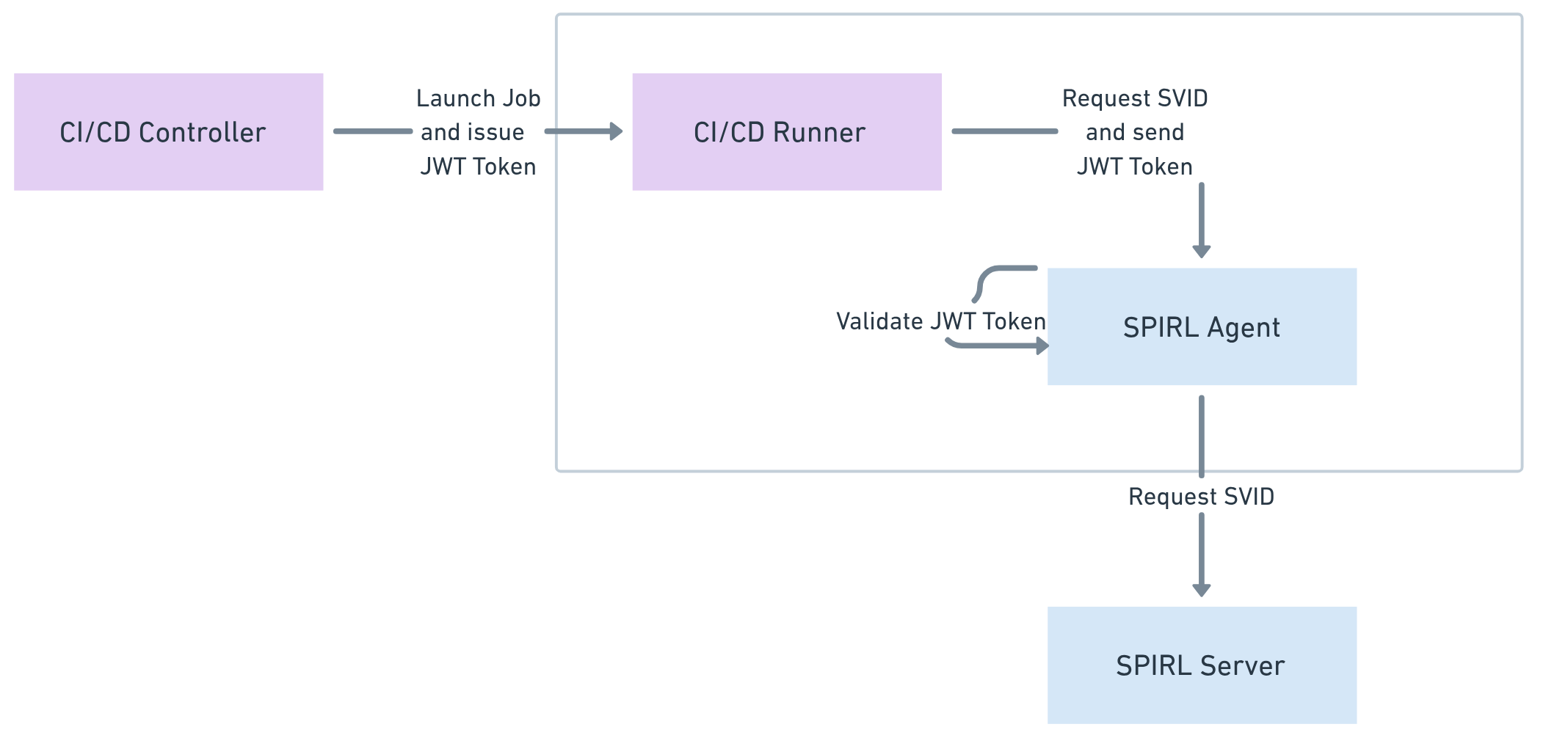
Configuring JWT Workload Attestation
For each CI/CD system that issues JWT tokens to jobs, configure a trusted issuer in the WorkloadAttestation managed config for the cluster. See the JWT Workload Attestor reference for all available fields.
section: WorkloadAttestation
schema: v1
spec:
  jwt:
    enabled: true
    allowedIssuers:
      - issuer: https://token.actions.githubusercontent.com
Apply it to a cluster:
spirlctl config set cluster --id <cluster-id> workload-attestation.yaml
Customizing SPIFFE IDs for CI/CD
Any claim from the validated JWT can be used in the SPIFFE ID path template via {{jwt.claim.<claim-name>}}. Configure the path template using the SVIDIssuancePolicy managed configuration:
section: SVIDIssuancePolicy
schema: v1
spec:
  policy:
    pathTemplate: "/{{cluster.name}}/repo/{{jwt.claim.repo}}/ref/{{jwt.claim.ref}}"
Apply it to a cluster:
spirlctl config set cluster --id <cluster-id> svid-issuance-policy.yaml
See SVID Issuance Policy for the full policy reference.
Requesting an SVID from a CI/CD Job
When a CI/CD job requests an SVID, it must pass the JWT token from the CI/CD issuer to the agent. The JWT token should be passed in the metadata of the gRPC call with the key identity-exchange-token.
Alternatively, use spirldbg to request the SVID with the token by using the flag --identity-exchange-token.
spirldbg svid-jwt --filename /tmp/jwt-svid --audience https://example.com --identity-exchange-token ${IDTOKEN}
CI/CD Profiles and Links
CI/CD Profiles and Links are the previous way to configure CI/CD JWT authentication. The JWT Workload Attestor is now the recommended approach: it is configured per-cluster via Managed Config and supports Realm Admin management. CI/CD Profiles remain available for existing users.
CI/CD Profiles are org-scoped resources that configure a trusted JWT issuer. To use a profile, it must be linked to a specific cluster.
Create a CI/CD Profile:
spirlctl ci-cd profile create jenkins-profile --issuer https://my-jenkins.example.com
Link the profile to a cluster:
spirlctl ci-cd profile link create CLUSTER_NAME PROFILE_NAME --trust-domain TRUST_DOMAIN_NAME
Once linked, agents in that cluster validate JWT tokens from the profile's issuer. The {{jwt.claim.<claim-name>}} path template syntax works the same way as with the JWT Workload Attestor.